Semantic Code Search: What It Is and How It Works
You know what you want to look at functionality that may already exist in your codebase, but maybe you don't know exactly what the function you’re looking for is called. Maybe you need the function that validates OAuth tokens, but across 500 repositories and three languages, grepping for "validate" returns thousands of results, most of them irrelevant. This is the problem semantic code search solves. Instead of matching exact strings, it finds code by meaning and intent, using vector embeddings and natural language processing to understand what code does, not just what it says.
In practice, this looks like typing "retry logic for failed API calls" into a search bar and getting back exponentialBackoff.ts, fetchWithBackoff.go, and ResilientHttpClient.java, none of which contain the word "retry" in their names. As AI coding agents and assistants increasingly rely on codebase context to generate accurate suggestions, semantic understanding of code has moved from a research topic to a production requirement. This guide covers how semantic code search works, how it compares to traditional keyword search, where it adds the most value, and which tools support it today.
What is semantic code search?
Semantic code search is an AI-powered approach to finding code based on what it does rather than the specific terms it uses. It converts code and queries into numerical representations called vector embeddings, then uses similarity matching to surface code that is conceptually related to a search query, even when no keywords overlap. Where traditional keyword search answers "where does this exact string appear?", semantic code search answers "where is the code that handles this concept?"
This distinction matters because developers rarely remember exact function names, variable names, or string patterns when searching unfamiliar codebases. A developer might search for "retry logic for failed API calls" and expect to find the function named exponentialBackoff in a utility module three repositories away. Semantic code search bridges that gap between how developers think about code and how code is actually written. In Sourcegraph, this is what Deep Search does: you ask a natural language question, and an AI agent iteratively searches your codebase using multiple search strategies, returning a synthesized answer with links to the exact files and functions it found.
How it differs from keyword-based code search
Keyword-based search, including regex and full-text search, operates on literal character patterns. You search for retryRequest, and the engine returns every file containing that exact string. This works well when you already know what you're looking for. But it breaks down in several common scenarios.
Different names for the same concept. One team calls it retryRequest, another calls it fetchWithBackoff, a third wraps it in a class called ResilientHttpClient. Keyword search treats these as completely unrelated. Semantic search recognizes they all handle the same pattern. Here's what this actually looks like: you search for "retry logic for failed API calls," and instead of zero results, you get all three implementations ranked by relevance, across repos and languages, without knowing any of them existed.
Natural language queries. Searching "how do we handle authentication in the payments service" returns nothing useful in a keyword engine. There's no string in your codebase that matches that sentence. Semantic search can interpret the intent and find the relevant authentication middleware.
Cross-language patterns. The same algorithm implemented in Go and Python looks entirely different at the text level. Semantic search can often identify conceptually similar patterns across languages because it operates on meaning, not syntax. The accuracy varies (languages with similar syntax, like Python and JavaScript, map better than structurally different languages like Haskell and C), but even approximate cross-language matching is valuable in microservice architectures where each team may have chosen a different language but implemented the same patterns.
That said, keyword search isn't obsolete. It's precise, fast, and predictable. When you know exactly what you're looking for, repo:payments-service file:auth in Sourcegraph's Code Search returns the exact match instantly. Semantic search complements keyword search. It doesn't replace it. The strongest code search implementations combine keyword, structural, and semantic search so developers can choose the right tool for each query. This is a meaningful trade-off: semantic search requires upfront indexing overhead and query-time embedding computation, and it can produce false positives where vector similarity doesn't map perfectly to functional relevance.
How semantic code search works
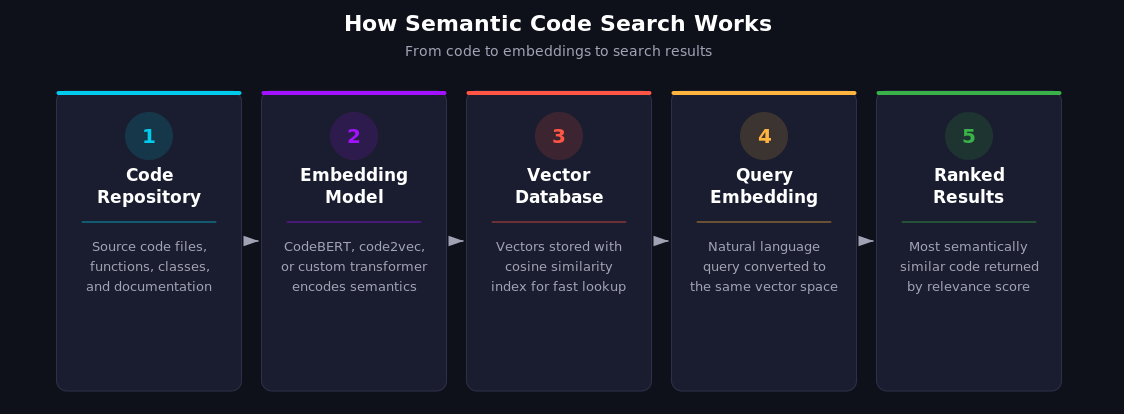
Semantic code search relies on a pipeline that transforms code into a searchable representation of its meaning. But modern systems rarely rely on embeddings alone. The most effective implementations combine vector search with keyword matching, structural analysis, and LLM reasoning, using each approach where it's strongest. Pure vector search is a useful building block, not a complete solution. Three core components make the full pipeline possible: code embeddings, natural language query processing, and large language models for deeper understanding.
Code embeddings and vector representations
The foundation of semantic search is converting code into vector embeddings. These are dense numerical arrays, typically hundreds to a few thousand dimensions (384 for lightweight models, 768 for CodeBERT-class models, 1024+ for newer large models), that capture the semantic properties of a code snippet. Functions with similar behavior end up close together in vector space, even if they share no keywords.
How embeddings are generated
A transformer-based model processes a code snippet and outputs a fixed-length vector. Models like CodeBERT, code2vec, and more recent specialized models (such as Jina's jina-embeddings-v2-base-code) are trained on millions of code-documentation pairs from datasets like CodeSearchNet, which contains 2 million function-docstring pairs across six languages. During training, the model learns that a Python function with a docstring about "retrying HTTP requests" should produce a vector close to a Go function that does the same thing. The quality of these embeddings determines everything downstream: a poorly trained model will cluster unrelated functions together and separate related ones, making search results unreliable.
Storage and retrieval
These vectors are stored in a vector database (such as Qdrant, Pinecone, or PostgreSQL with pgvector). When you search, your query is also converted to a vector, and the database returns the code snippets whose vectors are most similar, typically using cosine similarity or approximate nearest neighbor (ANN) algorithms. ANN is the practical choice for large codebases because exact nearest neighbor search scales poorly beyond a few million vectors. Some advanced implementations experiment with a dual-embedding strategy, pairing a general-purpose NLP encoder with a code-specific model to capture both semantic meaning and programming-language-specific patterns. This isn't standard practice (most production systems use a single model plus a reranking step), but for teams that need maximum accuracy, the trade-off is roughly double the indexing time and storage requirements.
Natural language queries to code
The real value of semantic search emerges when developers can describe what they need in plain English. Instead of constructing regex patterns or remembering exact function names, a developer types "where do we handle rate limiting for external API calls?" and gets relevant results.
This works because the same embedding model (or a compatible one) processes both the query and the code. The query "handle rate limiting" and a function named ThrottleMiddleware with rate-limiting logic produce vectors that are close in the embedding space, even though they share no words. In practice, this isn't magic: the model has seen enough code-description pairs during training that it has learned the association between the concept of "rate limiting" and the code patterns that implement it.
The quality of these results depends heavily on the embedding model, and this is where most teams underestimate the work involved. Off-the-shelf models work reasonably well for common patterns, but they struggle with domain-specific code that uses unusual naming conventions or internal frameworks. Custom-trained models perform significantly better on your own codebase. Cursor, for example, trained their embedding model on agent session traces, using LLM-ranked relevance judgments as a training signal, and reported internal improvements of roughly 12% on average in A/B testing across their model configurations.
The role of large language models
Large language models take semantic code search a step further. Instead of returning a ranked list of code snippets, an LLM-powered search can reason about the results, synthesize information across multiple files, and answer complex questions about a codebase. This is a qualitatively different experience from traditional search: instead of getting ten blue links and sifting through them, you get a direct answer with citations you can verify.
Sourcegraph's Deep Search demonstrates this approach. It uses an agentic loop where an AI agent iteratively queries the codebase using Code Search and Code Navigation, refines its understanding, and generates detailed answers with source citations. Here's what this looks like in practice: you ask, "How do we handle rate limiting in our APIs?" and Deep Search doesn't just find files with "rate limit" in them. It performs multiple rounds of search, follows cross-repository references, reads the actual implementations, and returns a synthesized explanation referencing specific files, functions, and patterns across repositories. It also generates a detailed source list showing exactly which searches it performed and which files it read, so you can verify its reasoning.
This is where the combination of search paradigms becomes critical. The LLM agent doesn't rely solely on vector similarity. It also uses keyword search, symbol search, and precise code navigation powered by Sourcegraph's SCIP (Source Code Intelligence Protocol) indexes. SCIP provides a near compiler-accurate understanding of code symbols, their definitions, and cross-repository references (accuracy depends on language support and index quality). The practical advantage: when Deep Search finds a function, it can trace every caller and every dependency across your entire codebase, not just the files that happen to mention it by name.
Semantic code search vs. keyword code search
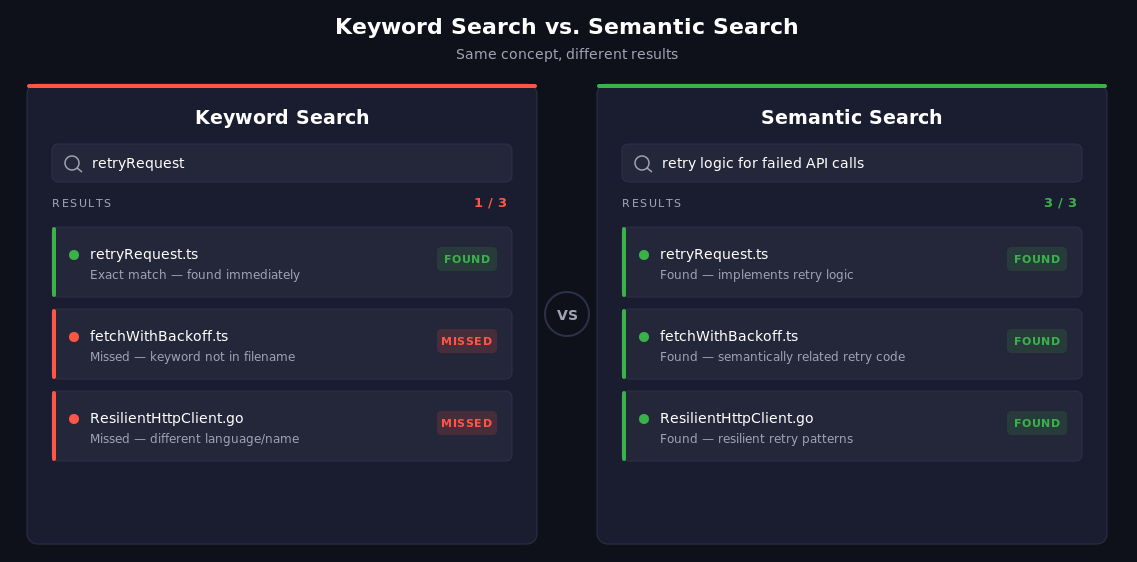
The choice between semantic and keyword search isn't binary. Each approach has distinct strengths, and the best results come from using both. Here's how they compare across key dimensions:
Structural search occupies a middle ground. Tools like Sourcegraph offer structural search that understands code syntax, letting you search for patterns like "all calls to http.Get where the URL argument contains a variable" without writing brittle regex. It's more precise than keyword search for code-specific patterns, though it still requires you to know the structural pattern you're looking for.
Where semantic search falls short
Semantic search isn't always the right tool. Search for "the function called processOrder in the checkout service" and semantic search may return conceptually related functions from other services that aren't what you wanted. The vector similarity between your query and processOrder is high, but so is the similarity to handlePurchase, completeTransaction, and a dozen other functions. Keyword search with repo:checkout-service processOrder returns the exact match instantly. Similarly, highly domain-specific internal terminology (proprietary acronyms, internal project names) often confuses embedding models that were trained on public code, producing irrelevant results.
The practical takeaway is to use keyword search when you know what you're looking for, structural search when you know the code pattern, and semantic search when you know the concept but not the implementation.
Use cases for semantic code search
Semantic code search adds the most value in scenarios where developers need to find code they don't already know exists. Here are the highest-impact use cases.
Finding code by intent (not just syntax)
The most common use case is also the most straightforward: searching for code based on what it does. "Find the function that parses JWT tokens" works even when the function is named decodeAuthPayload in one service and extractClaims in another.
Consider a concrete example. A developer searches for "validate credit card number" and semantic search returns this Go function:
// CheckLuhn verifies a numeric string using the Luhn algorithm.
func CheckLuhn(number string) bool {
    sum := 0
    alt := false
    for i := len(number) - 1; i >= 0; i-- {
        n := int(number[i] - '0')
        if alt { n *= 2; if n > 9 { n -= 9 } }
        sum += n
        alt = !alt
    }
    return sum%10 == 0
}
No mention of "credit card" or "validate" anywhere in the code. A keyword search would never surface this. But the embedding model recognizes that Luhn validation is semantically related to credit card number validation, and ranks it accordingly.
This is especially valuable in large, polyglot codebases where naming conventions vary across teams. A platform engineer searching for "how do we handle database connection pooling" can find every implementation across Go, Java, and Python services without knowing the specific patterns each team uses. With Sourcegraph's Deep Search, developers can ask these questions in natural language and get synthesized answers that span multiple repositories.
Accelerating developer onboarding
New developers joining a large codebase face a steep learning curve. Semantic search dramatically reduces the time to find relevant code because it doesn't require prior knowledge of the codebase's naming conventions, file structure, or architectural patterns.
Instead of asking a senior engineer, "Where's the code that handles payment processing?", a new developer can search for it directly and get results across all relevant services. This reduces interruptions for the team and helps new developers build a mental model of the codebase faster.
Security and vulnerability pattern detection
Security teams need to find patterns, not strings. Searching for "SQL injection vulnerability" across a codebase won't find anything useful with a keyword search because no developer labels their code that way. Semantic search can help surface code patterns that may indicate vulnerabilities: unsanitized inputs passed to database queries, deprecated cryptographic implementations, or deserialization of untrusted data. It doesn't replace dedicated SAST tools, but it's a powerful triage layer for identifying candidates worth investigating.
Combined with Sourcegraph's cross-repository search, security engineers can sweep entire organizations for vulnerability patterns. When a new CVE drops, the question shifts from "do we use this library?" (answerable with a keyword search) to "do we use this library in a way that's exploitable?" (which requires semantic understanding). This is a real workflow: a security team discovers a vulnerability in a serialization library, uses semantic search to find every place the codebase handles deserialization of untrusted input, then uses Batch Changes to apply the fix across all affected repositories in a single operation.
Cross-repository code discovery
In enterprises with hundreds or thousands of repositories, code duplication and reinvention are constant problems. Teams build the same retry logic, the same logging wrapper, the same configuration parser, unaware that another team solved the problem months ago.
Semantic search enables discovery across repository boundaries. A developer building a new retry mechanism can search "exponential backoff with jitter" and find existing implementations across the organization. Sourcegraph's cross-repository Code Navigation takes this further. It provides precise navigation that tracks symbol definitions and references across repo boundaries using SCIP indexes. You don't just find the code; you can trace how it's used across the entire dependency graph.
Semantic code search tools and platforms
Several tools now offer semantic search capabilities, each with different strengths and tradeoffs. Here's how the current landscape looks.
Sourcegraph: universal code search with semantic intelligence
Sourcegraph combines three search paradigms in a single platform: keyword search (with regex and boolean operators), structural search (syntax-aware pattern matching), and semantic search (through Deep Search). This makes it unique among code search tools because developers can choose the right search approach for each query without switching tools.
Deep Search is Sourcegraph's agentic semantic search. It accepts natural-language questions, uses an AI agent to iteratively search the codebase with Code Search and Code Navigation tools, and returns detailed answers with source citations. It works across every repository connected to your Sourcegraph instance.
Precise Code Navigation through SCIP (Source Code Intelligence Protocol) provides compiler-accurate, cross-repository understanding of code symbols. This goes beyond text-matching to track exactly where a symbol is defined, which version of a dependency you're using, and every reference across your codebase.
Sourcegraph supports GitHub, GitLab, and Bitbucket code hosts, with both cloud-managed and self-hosted deployment options for enterprises.
GitHub Code Search
GitHub's code search offers fast, full-text search across repositories with regex support and language-aware filtering. Through GitHub Copilot, semantic search capabilities are available as part of the agent tooling. GitHub reported that semantic search indexing completes in seconds for most repositories (especially smaller ones) and showed measurable improvements in task completion time when Copilot agents use it for context retrieval.
GitHub's semantic search is tightly integrated with Copilot rather than exposed as a standalone search interface, making it primarily useful as an agent context rather than for direct developer queries.
GitLab semantic search
GitLab offers semantic code search as part of GitLab Duo, currently in beta. It converts code to vector embeddings and stores them in a configurable vector database (Elasticsearch 8.0+, OpenSearch 2.0+, or PostgreSQL with pgvector). Search queries are embedded and compared against the code vectors for similarity matching.
GitLab's approach requires administrator setup and a supported vector store backend, which adds infrastructure complexity but provides flexibility for enterprises with existing database infrastructure.
Cursor and AI-native editors
Cursor, an AI-native code editor, uses custom-trained embedding models for semantic search. Their approach is notable for using agent session traces as training data. In internal evaluations, they reported accuracy improvements averaging roughly 12% across model configurations, with larger gains on some models than others.
Cursor's semantic search is designed to complement traditional grep, not replace it. Their research showed that combining both approaches produced better results than either alone.
Open-source options (CodeSearchNet, Qdrant)
For teams building custom semantic search, several open-source tools are available. CodeSearchNet is a benchmark dataset from GitHub containing 2 million function-docstring pairs across six languages (Python, JavaScript, Ruby, Go, Java, PHP). It's the de facto standard for evaluating code search models, though the dataset itself dates to 2019.
Qdrant is an open-source vector database written in Rust that can serve as the storage and retrieval layer for a custom semantic code search pipeline. Their documentation includes a tutorial on building code search with dual embeddings: a general NLP encoder (all-MiniLM-L6-v2) paired with a code-specific model (jina-embeddings-v2-base-code). This approach offers maximum flexibility but requires significant engineering effort to build and maintain.
How to implement semantic code search
If you're evaluating or building semantic code search for your organization, three decisions will shape the outcome: embedding model selection, indexing strategy, and workflow integration.
Choosing an embedding model
The embedding model determines search quality more than any other component. You have three broad options.
General-purpose NLP models like all-MiniLM-L6-v2 capture broad semantic meaning and work across natural language and code. They're fast and easy to deploy, but may miss code-specific nuances like control flow patterns or type relationships.
Code-specific models like CodeBERT, code2vec, or jina-embeddings-v2-base-code are trained specifically on code and understand programming-language-specific semantics. They perform better on code-to-code similarity but may not handle natural language queries as well.
Custom-trained models fine-tuned on your own codebase and usage patterns produce the best results but require training data (like agent session traces or relevance judgments) and ongoing maintenance. Cursor's approach, training on LLM-ranked relevance data from real developer sessions, is one proven methodology.
Most production systems benefit from a hybrid approach. Pair a general NLP model with a code-specific model, or use a platform like Sourcegraph that combines multiple search modalities so no single embedding model carries the entire burden.
Indexing your codebase
Indexing converts your code into searchable embeddings. Key considerations include granularity (function-level vs. file-level chunks), update frequency (real-time vs. batch), and compute cost.
Function-level chunking is the most common approach. Parsing code into individual functions or methods produces embeddings that are specific enough to return useful results without being so granular that context is lost. But granularity is a real trade-off: function-level chunks miss context that spans multiple functions (like a class whose methods work together to implement a pattern), while file-level chunks produce embeddings that are too diluted to match specific queries well. Some teams use overlapping chunks or include surrounding context (imports, class definition, neighboring functions) to mitigate this.
Incremental indexing matters for large codebases. GitLab, for example, processes embeddings incrementally when code is merged to the default branch, avoiding the cost of re-embedding the entire codebase on every change. Without incremental indexing, a codebase with 100,000 files could take hours to re-embed after every merge, making real-time search impractical.
Infrastructure requirements vary significantly. Cloud-hosted solutions like Sourcegraph handle indexing infrastructure for you. Self-hosted approaches using Qdrant or similar vector databases require provisioning and managing additional infrastructure, including GPU resources for embedding generation if you're processing large codebases quickly. The tradeoff between operational simplicity and data control depends on your organization's requirements.
Integrating with developer workflows
Semantic search delivers the most value when it's embedded in the tools developers already use. IDE integration (VS Code, JetBrains), web interfaces, and API access for CI/CD pipelines all reduce friction. A semantic search feature that requires developers to open a separate tool gets ignored; one that's available where they already work gets adopted.
Sourcegraph addresses this through its web interface and CLI tools. Its MCP (Model Context Protocol) server lets AI coding agents access code search programmatically, so semantic search powers automated workflows and agent context retrieval alongside manual developer queries. This is increasingly important as AI-assisted development matures: agents that can semantically search your codebase produce more accurate code suggestions than agents limited to the files currently open in your editor.
Conclusion
Semantic code search represents a fundamental shift in how developers navigate large codebases. Moving from "find this exact string" to "find code that does this thing" changes what's possible when searching across hundreds of repositories, multiple languages, and teams that use different naming conventions. But it works best as part of a broader code search strategy, not as a replacement for existing tools. Keyword search still wins for precision when you know what you're looking for. Structural search catches syntax-level patterns that embedding models miss. Semantic search fills the gap where intent matters more than exact terms. The strongest results come from combining all three, choosing the right tool for each query.
Sourcegraph is the platform that brings all three together, combining keyword search, structural search, and AI-powered semantic search in a single code intelligence platform. Deep Search handles natural language questions with agentic, multi-step reasoning. Code Search handles exact matches and regex patterns with full boolean operators. SCIP-powered Code Navigation provides compiler-accurate understanding across repositories. Whether you're onboarding new developers, hunting security vulnerabilities, or discovering existing implementations across your organization, you can get started with Sourcegraph and search your codebase today.
Frequently asked questions
What is semantic search in code?
Semantic search in code uses AI and vector embeddings to find code based on meaning rather than exact keyword matches. It converts code snippets and search queries into numerical representations (vectors of 384-768 dimensions), then finds code that is conceptually similar to the query using cosine similarity. This works even when the code uses different variable names, function names, or programming languages, because the embedding model has learned to map functionally similar code to nearby points in vector space.
What is semantic search vs code search?
Semantic search finds code by understanding what it does. Traditional code search (keyword, regex, full-text) finds code by matching character patterns. They serve different purposes. Keyword search is faster and more precise when you know what you're looking for. Semantic search excels at discovery, where you know the concept but not the exact implementation. Most modern code intelligence platforms combine both approaches.
How does semantic code search handle multiple programming languages?
Semantic code search handles multiple languages by operating on meaning rather than syntax. The embedding models used in semantic search are typically trained on code across many languages, so they learn that a Python function doing exponential backoff is conceptually similar to a Go function doing the same thing. Code-specific models like CodeBERT are explicitly trained on multilingual code corpora, and benchmarks like CodeSearchNet evaluate cross-language retrieval performance. That said, cross-language accuracy varies: models perform best across languages that share similar syntax (Python/JavaScript) and less accurately across structurally different languages (Haskell/C). For enterprise polyglot codebases, platforms like Sourcegraph supplement embedding-based search with SCIP-powered precise code navigation, which provides compiler-accurate cross-language symbol resolution.
.avif)

