Developer Productivity: How to Measure and Improve It
Developer productivity is one of the most debated topics in software engineering. Ask ten engineering leaders how they measure it, and you'll get ten different answers. Some swear by deployment frequency and cycle time, others focus on developer satisfaction and flow state, and many admit they're mostly guessing. Productivity isn't a single metric. It's shaped by code quality, team processes, tooling, organizational culture, and the ever-growing complexity of the codebases developers work in every day.
The conversation around productivity measurement has changed dramatically over the past decade. Engineering teams have moved away from crude output metrics such as lines of code and hours worked toward more sophisticated frameworks, including DORA metrics and the SPACE framework. The shift reflects a fundamental truth: software developers aren't factory workers whose output scales linearly with effort. Productivity isn't about squeezing more code out of people. It's about creating conditions where developers can do their best work, solve problems efficiently, and maintain a sustainable pace, even as codebases grow faster than ever with AI tools accelerating the volume of code being written.
This article covers what developer productivity actually means, the frameworks for measuring it responsibly, and practical strategies to improve it.
What Is Developer Productivity?
Developer productivity is the capacity of engineers to deliver business value: features, bug fixes, infrastructure improvements, whatever moves the organization forward. Note the word: "capacity," not "output." It's not about hours worked or lines of code written; it's about how efficiently developers translate intent into working, maintainable software.
To see why the distinction matters, consider two developers. One ships five features in a week, but each one creates technical debt that will cost the team weeks to maintain. Another ships one well-designed feature that users actually adopt and that integrates cleanly with the existing architecture. By naive output metrics, the first developer looks five times more productive. By any meaningful business measure, the second one delivered more value.
This reframing matters because organizations have historically treated productivity as a pure output problem: how to get more, faster. The organizations that get it right understand it differently. Productivity emerges when you remove friction: unclear requirements, slow feedback loops, painful tooling, excessive context-switching, and codebases that are harder to navigate than they need to be. Fix the environment, and the output follows.
Why Developer Productivity Is Hard to Measure
Measuring developer productivity is genuinely difficult. The first step is acknowledging that difficulty honestly.
Software development isn't a repetitive manufacturing process where each unit of output is identical. No two features are the same. A developer might spend three weeks designing a system architecture that will save months of rework downstream, producing zero deployed code in that period. By naive metrics, they contributed nothing; in reality, they delivered enormous value. The challenge of distinguishing between these cases makes most simple measurement approaches unreliable.
Then there's the lag problem. Your team's productivity today reflects decisions made months ago: the architecture you chose, the technical debt you accumulated, the people you hired, the processes you established. Measuring productivity requires sorting through leading and lagging indicators and determining which ones to trust.
And there's the invisible work. Engineers spend enormous amounts of time in meetings, code reviews, mentoring, debugging production issues, and searching for information about their codebase. This work is essential to team velocity and code quality, but it's invisible to most productivity metrics. A team that devotes 40% of its time to these activities will look less productive than a team spending 10% on them, even if the first team ships higher-quality, more maintainable code.
The industry learned this lesson the hard way. In the 1990s and 2000s, organizations optimized ruthlessly for output metrics: lines of code, features shipped, bugs fixed per week. The result was unmaintainable code, burned-out developers, and systems that collapsed under their own weight. The lesson remains relevant today: if you measure the wrong thing and optimize for it, you'll get exactly what you measured, not what you actually wanted.
Frameworks for Measuring Developer Productivity
Rather than building from scratch, use frameworks the industry has tested and refined over years of research. They won't give perfect answers, but they provide structure for thinking about productivity in a balanced way.
DORA Metrics
DORA (DevOps Research and Assessment) came from research by Nicole Forsgren, Jez Humble, and Gene Kim, who surveyed thousands of engineering teams and identified four metrics that correlate strongly with software delivery performance and broader organizational outcomes like revenue, profitability, and market share.
The four metrics are: deployment frequency (how often you release to production), lead time for changes (time from code commit to production), mean time to recovery (how fast you fix incidents), and change failure rate (what percentage of deployments cause incidents). DORA's power lies in its focus on outcomes rather than activity. The framework ignores hours worked and meetings attended. It measures whether your team can ship code safely and frequently. Research shows that teams performing well on DORA metrics report higher job satisfaction and better work-life balance, which suggests it's not a "crunch harder" framework.
DORA has limits. A team might inflate deployment frequency by shipping tiny, low-risk changes while deferring complex work. Or achieve a low lead time by skipping code review. Code reaches production faster when nobody reviews it, but that's not useful speed. Use DORA as a starting point, not the complete picture.
The SPACE Framework
The SPACE framework, developed by researchers at UC Berkeley and GitHub, expanded the conversation about productivity beyond delivery metrics. SPACE stands for Satisfaction and well-being, Performance, Activity, Communication and collaboration, and Efficiency and flow.
SPACE adds the recognition that productivity isn't just about shipping. It's about the conditions that enable sustainable shipping. Do developers feel satisfied? Can they enter flow state regularly? Is communication overhead reasonable? Do tooling and codebase support efficient work? An engineering team might post excellent DORA numbers while developers are burned out, fighting tools, and constantly context-switching. SPACE captures the dimensions that pure delivery metrics miss.
SPACE is more complex to measure than DORA. Performance maps to DORA metrics, but satisfaction requires surveys, communication requires both quantitative and qualitative assessment, and efficiency requires understanding where developers actually spend their time. Still, SPACE provides a conceptual model that keeps measurement honest.
Developer Experience (DevEx)
Developer Experience (DevEx), led by Dr. Margaret-Anne Storey at DevEx Research, focuses on the quality of a developer's day-to-day experience. It emphasizes three dimensions: feedback loops (how quickly developers get information about their code), cognitive load (mental effort required to accomplish tasks), and flow state (uninterrupted work time).
DevEx is useful for teams targeting productivity improvements through tooling and process. Instead of vague goals like "be 20% faster," DevEx asks specific questions: where does friction live in your workflow? Which feedback loops are too slow? Where is cognitive load unnecessarily high? Codebase complexity often emerges as the culprit. When developers spend significant time just trying to understand existing code before they can modify it, cognitive load is high, and feedback loops are slow.

Key Developer Productivity Metrics
Which specific metrics should you track? Pick a framework or draw from several, then focus on these.
Cycle Time and Lead Time
Cycle time measures how long it takes from when a developer starts on a task to when it's deployed to production. Lead time measures how long it takes from when the task is first requested to when it's deployed. Both highlight how efficiently your team moves work through the development pipeline, and decreasing them, when done responsibly, correlates with better outcomes. Teams with short cycle times accumulate less work-in-progress, are forced to think about dependencies and bottlenecks, and get faster feedback on their decisions.
The trap to watch for: optimizing for speed at the cost of quality. A team with a one-day cycle time that ships bug-filled code isn't truly productive. They've just moved the cost to different parts of the organization.
Deployment Frequency
How often does your team deploy to production? Deployment frequency forces useful conversations about your release process. Teams deploying multiple times a day typically have smaller, better-tested changes and faster feedback loops. Teams deploying quarterly have riskier releases and slower learning cycles.
But frequency alone isn't the goal. Shipping value safely is. A team deploying seventeen times a day with trivial changes isn't necessarily more productive than a team deploying twice a week with substantial, well-tested features. Context matters.
Code Review Turnaround
How long does code wait in review? Code review is essential for quality and knowledge sharing, but slow reviews create cascading problems: developers context-switch, lose their mental model, and have to rebuild context when feedback arrives. Each cycle adds days to what should be fast.
Track review turnaround to identify bottlenecks. Is it reviewer capacity, process design, or something else? Often, it's that reviewers lack the codebase context needed to review quickly and confidently, especially in large multi-repository environments where understanding change impact requires navigating across service boundaries.
Developer Satisfaction and Flow State
Quantitative metrics matter, but so do developers' subjective experiences. Are they happy? Do they regularly achieve flow state? Are they trending toward burnout?
Developer satisfaction correlates with retention, code quality, and innovation. Measure it through regular surveys using SPACE or DevEx questions: "How often do you get uninterrupted flow time?" or "How satisfied are you with your tooling?" Tracked over time, subjective measures reveal things about your organization that no dashboard can.
Proven Strategies to Improve Developer Productivity
How do you improve? Remove friction rather than add pressure.
Reduce Context Switching
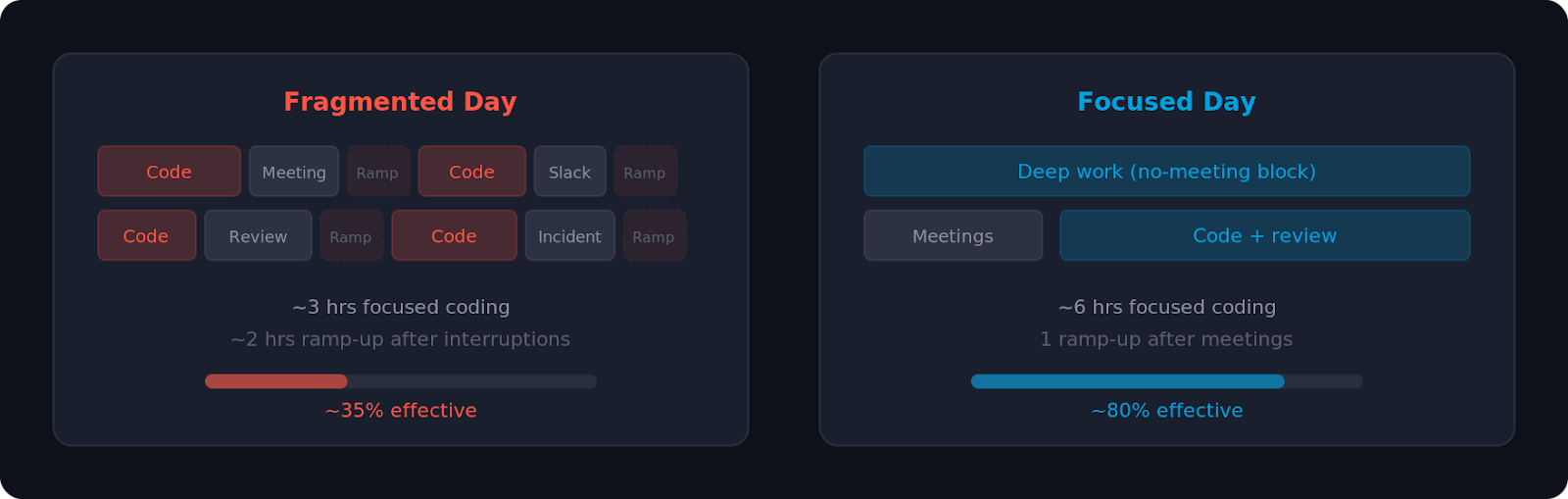
Context switching is one of the largest hidden drains on developer productivity. When a developer is interrupted mid-task by a meeting, Slack message, colleague question, or production alert, they lose more than the five minutes of the interruption. Research shows they lose 20-30 minutes rebuilding the mental context. Across a team, across weeks and months, these interruptions compound into enormous amounts of lost time.
The organizational fixes are straightforward, even if they require discipline: minimize meetings during core coding hours, protect "no-meeting blocks" where developers can focus, and be intentional about which communication is synchronous (real-time, interrupting) versus asynchronous (batched, non-interrupting).
A tooling dimension of context switching often goes overlooked. When a developer needs to understand a pattern elsewhere in the codebase, figure out who owns a service, or trace a data flow across repositories, they have two choices: interrupt a colleague or search independently. The first creates another interruption. The second's speed depends entirely on the tools. A CERN engineer using Sourcegraph described answering questions in seconds instead of interrupting colleagues. These small improvements, compounded across dozens of engineers, add up to meaningful team productivity gains.
Invest in documentation, onboarding, and code search tooling to make information discoverable instead of trapped in people's heads. Faster independent code context discovery means fewer team interruptions.
Automate Repetitive Tasks
Every minute spent on repetitive, low-thought work is unavailable for creative problem-solving that moves products forward.
Find automation opportunities at every stage: CI/CD pipelines that catch issues before humans intervene, automated testing that eliminates manual QA, linters and formatters that resolve style debates at commit time, and infrastructure scripts that provision environments without manual steps. Each frees cognitive capacity for higher-value work.
AI coding assistants have dramatically increased code volume. Sourcegraph's data shows 84% of enterprise customers saw code volume increase after adopting AI tools. More code means more to search, review, understand, and maintain. Without corresponding improvements in tooling and automation, this can slow teams down: more code to review, more dependencies, more bugs. Teams that benefit most from AI tools are the ones investing in infrastructure to manage the added complexity.
Improve Developer Tooling
Developers spend hours daily inside their tools. Slow, confusing, or painful tools erode productivity in ways that rarely show up in metrics but that every developer feels.
Obvious tooling matters: IDE quality, language runtime performance, package manager reliability, and local development speed. So do less obvious ones: error message clarity, deployment dashboard usability, monitoring tool ergonomics, and the ability to navigate large, complex codebases efficiently.
As organizations scale, codebase navigation becomes critical. Code intelligence tools like Sourcegraph give developers organization-wide visibility: instead of guessing where functions are used or manually grepping repositories, developers understand code relationships, trace dependencies, and find how problems have been solved elsewhere, instantly across every repository. Sourcegraph's Deep Search adds AI, letting developers ask natural-language questions and get comprehensive answers. As codebases grow, especially with AI-generated code, this visibility moves from "nice to have" to essential. Palo Alto Networks, for example, reported a 40% productivity boost for its 2,000-person team after deploying Sourcegraph.
Audit your tooling regularly. Ask developers which tools they complain about and where friction slows them down. Often, modest tooling investments eliminate disproportionate friction.
Optimize Code Review Processes
Code review is essential for quality and knowledge sharing, but poor process design creates bottlenecks, discourages contributions, and erodes developer satisfaction.
Start with structural changes. Smaller pull requests move through review faster. Encourage developers to break work into independently reviewable chunks. Set clear expectations: define standards, specify reviewers, and distinguish blocking issues from suggestions. If reviewers are slow, diagnose whether the bottleneck is capacity, process, or unfamiliarity with the code.
Automation helps. Linters, type checkers, and tests should catch low-level issues before humans see the code. This lets reviewers focus on what they're good at: evaluating architecture, questioning design, and catching logical errors in context.
Tools for Tracking Developer Productivity
Several tools automate metric collection and provide dashboards to make data actionable.
Don't over-instrument. Measuring everything feels scientific, but creates noise. Start with one framework (DORA or SPACE), measure what matters, add team feedback, and focus improvement efforts on the highest-leverage areas.
Common Mistakes in Measuring Productivity
Even well-intentioned organizations stumble when they start measuring developer productivity. These are the most common traps.
Optimizing for the metric rather than the outcome. If you measure deployment frequency, teams deploy constantly without shipping value. If you measure lines of code, developers write verbose implementations. Gut-check: does improving this metric lead to better business outcomes, happier customers, more stable systems, or more engaged developers?
Ignoring the qualitative side. A team with excellent DORA metrics but terrible satisfaction heads toward burnout and attrition. Quantitative metrics are incomplete. Triangulate with surveys and conversation.
Measuring activity instead of outcome. Lines of code, pull requests per week, and commits per day are activity measures, not productivity measures. One developer might submit ten mediocre pull requests while another submits one architectural improvement that accelerates the entire team. Measure outcomes: Did you ship features users wanted? Did you reduce bugs? Did you improve system performance?
Not accounting for the type of work. Building a new feature differs fundamentally from paying down technical debt, which differs from responding to production incidents, which differs from mentoring junior developers. Not all work produces the same kind of measurable output, and good frameworks acknowledge this diversity.
Comparing teams against each other. Team A might have a lower deployment frequency than Team B because Team A works on safety-critical systems requiring exhaustive validation, while Team B prioritizes velocity. Using metrics as a leaderboard backfires because context matters.
Measuring without action. Metrics are only valuable if you act on them. Collecting data and ignoring results wastes time and builds cynicism. Commit to regular retrospectives where you review metrics, identify opportunities, and follow through.
Conclusion
Developer productivity is complex because software development is complex. There's no single metric that captures it and no silver bullet that improves it. That doesn't mean skipping measurement. Be thoughtful about how you measure and what you do with the results.
Start with a framework. DORA metrics provide a foundation for delivery performance. SPACE adds dimensions around experience and satisfaction. DevEx focuses on friction and flow. Pick one, measure honestly, supplement with team feedback.
Focus on removing friction, not adding pressure. Developers aren't knowledge workers whose productivity emerges from their environment. Reduce unnecessary meetings, improve tooling, automate repetitive work, streamline processes, and listen to where developers feel friction. Organizations that invest in the right tools, especially visibility across large evolving codebases, see compounding returns as their teams grow.
Measure to inform decisions, not for its own sake. Use metrics to understand team performance, identify bottlenecks, and validate improvements.
Developer productivity matters as a means to an end: creating conditions where talented people do their best work, ship value sustainably, and feel good about what they build.
Try Sourcegraph Code Search to see how cross-repository code intelligence helps teams find answers faster. Schedule a demo to learn how organizations like Palo Alto Networks and CERN use it.
.avif)

