Detecting supply chain attacks at scale with Deep Search
Two days ago, on March 24, threat actor TeamPCP pushed poisoned versions of LiteLLM (1.82.7 and 1.82.8) to PyPI. The malicious code grabbed cloud credentials, SSH keys, and Kubernetes secrets from any machine that installed it. Snyk published a detailed write-up of the incident.
The first question everyone asks is, are we at risk? And then, how do we fix it?
A pinned dependency at litellm==1.80.5 is safe. An unpinned litellm, or a range like litellm >= 1.0.0, pulls the poisoned version automatically during a fresh install or a CI/CD run. The version constraints in your codebase determine the attack surface.
We used Deep Search to trace this across public code at scale. Here's what we found and how to reproduce it.
Starting with Deep Search
We started by asking Deep Search a question:
Do any repositories use this version of the litellm Python package (1.82.7 or 1.82.8)? They contain malicious code that stole cloud credentials, SSH keys, and Kubernetes secrets. Are any non-affected repositories employing version pinning to mitigate the issue? They should pin to <1.82.6 until a clean release is available.
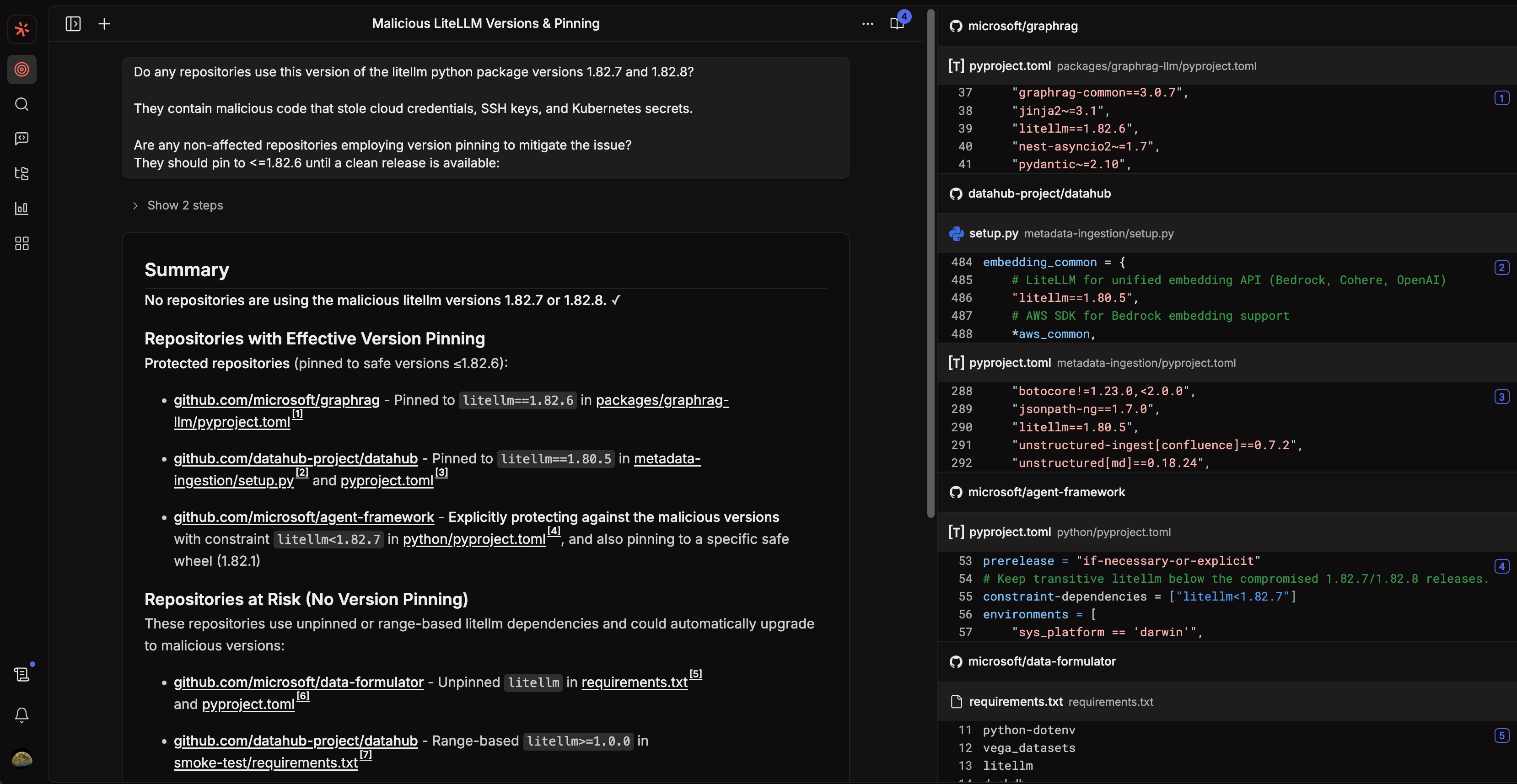
Deep Search ran its own investigation. It searched across dependency files, checked version constraints, categorized repos by risk, and returned a structured summary with references to specific files in specific repos.
Within two steps, it had:
Confirmed no repositories pinned to the malicious versions 1.82.7 or 1.82.8
Identified protected repositories (microsoft/graphrag pinned to 1.82.6, datahub-project/datahub pinned to 1.80.5, microsoft/agent-framework with an explicit litellm<1.82.7 constraint)
Flagged at-risk repositories using unpinned or range-based dependencies (microsoft/data-formulator with a bare litellm, datahub-project/datahub's smoke-test directory with litellm>=1.0.0)
That's the whole triage, and it gives us the search syntax to verify with a more exhaustive search across the codebase.
From Deep Search to Code Search queries
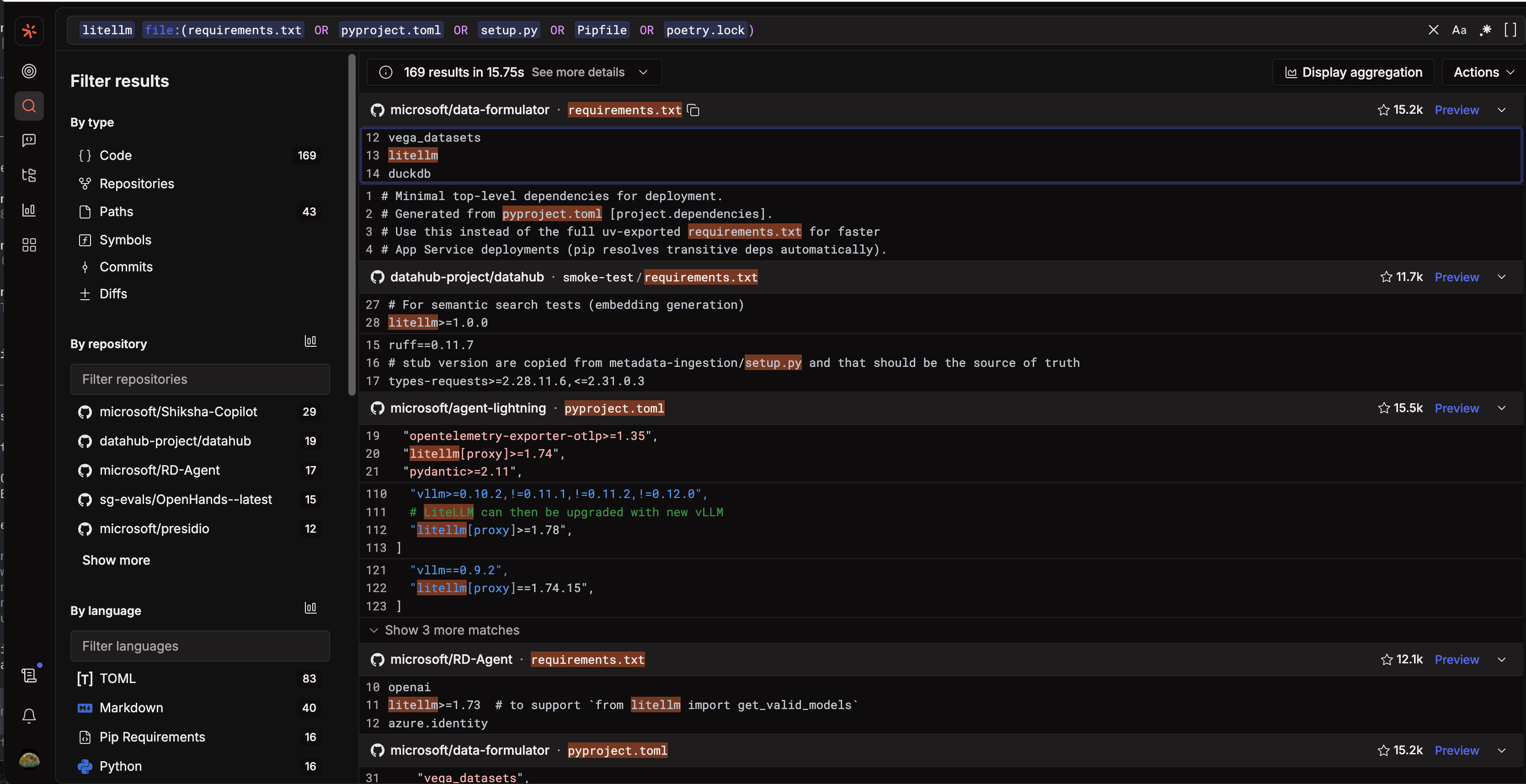
Deep Search gives you the overview. When you need exhaustive coverage, you take what it found and write targeted Code Search queries. Here are the five we used.
1. Detect explicit installs of the compromised versions
litellm==1.82.7 OR litellm==1.82.8 file:(requirements.txt OR pyproject.toml OR setup.py OR Pipfile OR poetry.lock)
Result: Zero matches across all indexed repositories. No one had pinned to either compromised version.
2. Identify repos protected by version pinning
litellm==file:(requirements.txt OR pyproject.toml OR setup.py OR Pipfile OR poetry.lock)
Manual verification showed repos pinned to specific, safe versions:
# microsoft/graphrag
litellm==1.82.6
# datahub
litellm==1.80.5
# agent-framework
constraint-dependencies = ["litellm<1.82.7"]
Pinned or upper-bounded constraints prevent accidental upgrades to the poisoned release.
3. Find vulnerable patterns: range-based or unpinned
litellm>= OR litellm> OR litellm~
file:(requirements.txt OR pyproject.toml OR setup.py OR Pipfile OR poetry.lock)
And for completely unpinned declarations:
litellm
file:(requirements.txt OR pyproject.toml) /^litellm$/
Both queries returned results like:
# vulnerable: range-based, accepts any version above 1.0.0

litellm>=1.0.0
# vulnerable: no version constraint at all

litellm
Either pattern would have accepted 1.82.7 or 1.82.8 during a fresh install.
4. Trace transitive exposure
Some repositories don't declare LiteLLM directly but pull it in through another package:<
repo:.* file:(requirements.txt OR pyproject.toml)(litellm OR "litellm[")
Then broaden:
context:global litellm
This surfaced indirect inclusions such as embedding frameworks that bundle LiteLLM, test-only dependencies most teams would overlook, and internal tooling repos that pull it in through an intermediary.
5. Confirm defensive patterns
litellm<1.82.7 OR litellm<=1.82.6
Finds repos that explicitly block the compromised versions:
constraint-dependencies = ["litellm<1.82.7"]
Findings
No repository in our index had installed the poisoned versions directly. The actual risk came from how version constraints were defined.
In this attack, multiple repos can depend on LiteLLM, with some safe and others vulnerable. The difference is a single == vs >= in a requirements file.
Reproduce this yourself
You can start the same way we did: open Deep Search and ask a question about the compromised package. Deep Search will generate the initial triage, identify affected repos, and categorize them by risk.
Then take the results into Code Search for exhaustive enumeration:
Find all usage:
litellm file:(requirements.txt OR pyproject.toml)
Find unsafe installs:
Range-based
litellm>= OR litellm> OR litellm~ file:(requirements.txt OR pyproject.toml)
Unpinned
file:(requirements.txt OR pyproject.toml) /^litellm$/
Find safe pinning:
litellm== OR litellm<
file:(requirements.txt OR pyproject.toml)
Find specific compromised versions:
litellm==1.82.7 OR litellm==1.82.8
Or skip the individual queries and use a single broad search with Sourcegraph's -content filter to find any repo that references litellm with a loose version spec but doesn't pin to a known-safe version (≤1.82.6):
file:(requirements|setup|pyproject|Pipfile) /litellm([>~]=?)/ -content:/litellm[<!=]=.*1\.82\.[0-6]\b/
This is the query you want to run first. It catches unpinned, greater-than, and compatible-release specs across all indexed repos, surfacing any dependency declaration that could resolve to a vulnerable version.
Supply chain attacks don't need to be sophisticated to work. This one succeeded because a single package on PyPI accepted a version bump, and most dependency files didn't block it. The fix is simple: pin your versions, set upper bounds, and audit what your CI pipeline installs. Deep Search and Code Search tell you where you stand in minutes. The next compromised package probably won't be LiteLLM, but the same approach applies. Swap in the package name, adjust the version, and run the search.
.avif)

