Best Developer Experience Tools for 2026
Developer experience (DevEx) is the overall quality of a developer's interaction with the tools, processes, and systems they use every day. Companies that invest in developer experience gain a measurable competitive advantage: faster onboarding, higher retention, and more time spent on creative work instead of fighting tooling friction. As ex-Googlers discovered when leaving Google, the gap between great developer experience and the industry default is enormous. Closing that gap starts with choosing the right tools.
This guide covers 12 tools across six categories, helping you understand what each category does and which tools stand out within it.
What Are Developer Experience Tools?
Developer experience tools are software products designed to reduce friction in the software development lifecycle. They target the bottlenecks that slow engineers down: searching for code across hundreds of repositories, waiting for builds to finish, navigating unfamiliar services, or tracking migration completion.
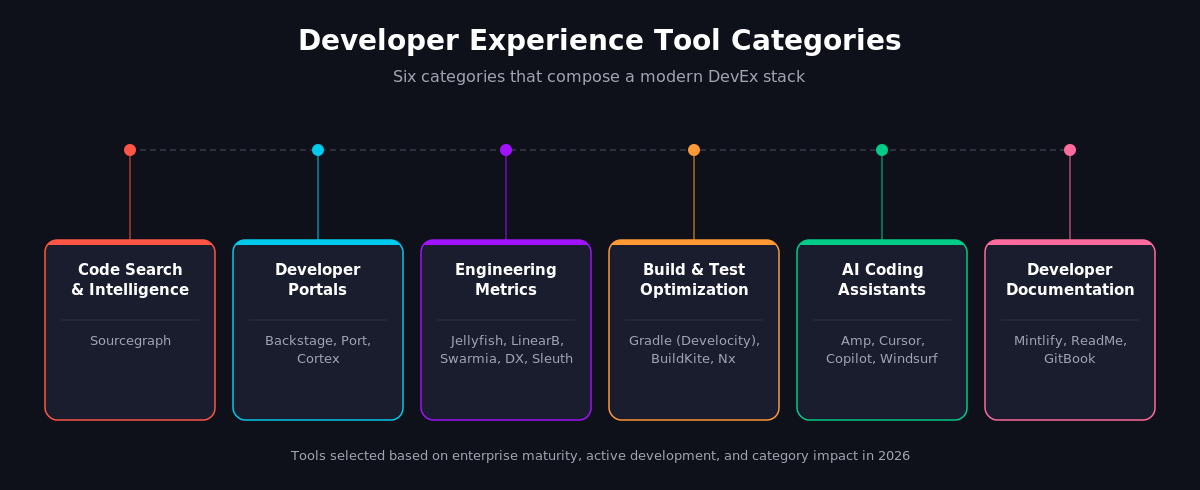
Today, developer experience tooling spans six major categories:
Key Features to Look for in DevEx Tools
Not every team needs every category. But regardless of which tools you evaluate, four capabilities separate tools that actually improve developer experience from tools that just add another dashboard.
Integration depth matters more than feature count. A metrics platform that connects to your issue tracker, version control, and CI system gives you a complete delivery picture. One that only reads from GitHub leaves blind spots. Ask: Does this tool connect to the systems my team already uses?
Scalability determines whether the tool survives your growth. Sourcegraph's Code Search, for example, is built to handle 100 to over one million repositories because enterprise codebases grow faster than most tools anticipate. Check how any tool performs at 10x your current scale before committing.
Developer adoption is the ultimate test. Look for products that meet developers where they already work: in their IDE, in their terminal, in their pull request workflow. Tools that require context-switching to a separate web app add cognitive load and see lower adoption.
Actionability over observation. Passive metrics show you a DORA score. Active tools reveal what is causing your lead time to spike and provide automations to fix it. That distinction is where the strongest DevEx tools differentiate.
12 Best Developer Experience Tools for 2026
1. Sourcegraph: Code Search and Code Intelligence
Category: Code Search & Intelligence
Best for: Enterprise teams that need to search, understand, and modify code across large, multi-repo codebases
Sourcegraph is a software engineering intelligence platform that provides universal code search across every repository, branch, and language in your organization. Where IDE-level search stops at the project boundary, Sourcegraph Code Search works across multiple code hosts (GitHub, GitLab, Bitbucket, Perforce). It supports many major programming languages with advanced query syntax, regex, and syntax-aware structural search patterns.
What sets Sourcegraph apart from basic grep-style tools is the intelligence layer built on top of search. SCIP-powered code navigation provides jump-to-definition and find-references across repositories. Engineers can trace how a function is used across the entire codebase without cloning dozens of repos locally.
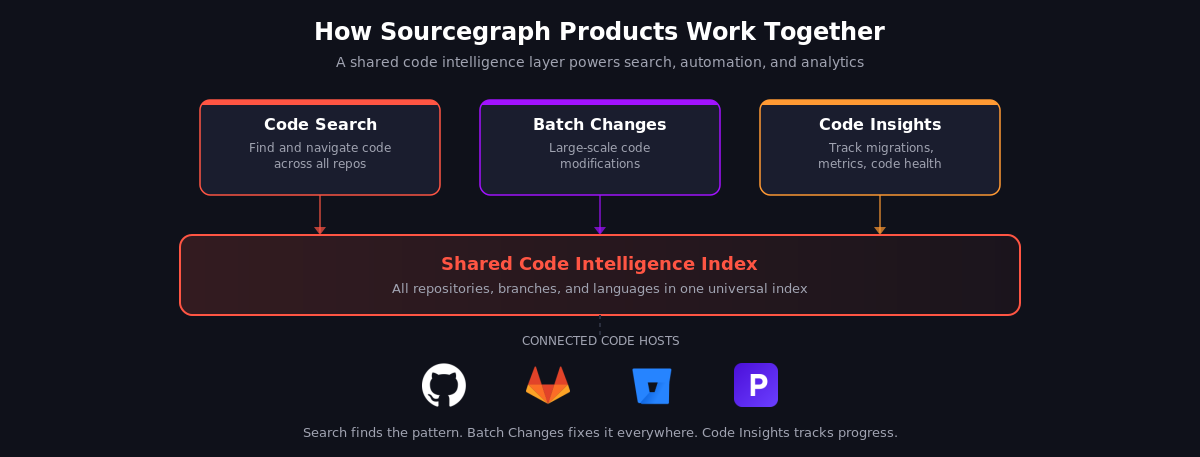
For engineering leaders, two features stand out. Batch Changes lets you define a search pattern and a modification script, then apply that change across hundreds of repositories in a single operation. Repetitive tasks like security patches, dependency upgrades, and API migrations that used to take weeks of manual PRs become a single coordinated batch. Code Insights turns your codebase into a queryable database, tracking migration progress, version adoption, code smells, and custom metrics in real-time dashboards.
What stands out: Sourcegraph treats code intelligence as a foundational layer. Search, navigation, bulk changes, and analytics all share the same index and understanding of your code. Batch Changes uses the same code index as Code Insights.
2. Backstage: Open-Source Developer Portal
Category: Developer Portal
Best for: Engineering organizations that want full control over their internal developer portal with a strong plugin ecosystem
Backstage is an open-source framework for building internal developer portals, originally created at Spotify and now a CNCF Incubation project. Its software catalog tracks every component your teams build (services, libraries, data pipelines, infrastructure). Its plugin architecture lets teams integrate Kubernetes dashboards, CI/CD status, documentation (via TechDocs), and cost monitoring into a single developer experience across the tech stack. Software Templates with Golden Path scaffolding help teams create new services that follow organizational standards from day one.
In 2025, Spotify launched Portal for Backstage, a commercial offering adding production-ready plugins for service maturity scoring, incident management, an AI Knowledge Assistant, and a Catalog Wizard. Cloud Backstage provides a hosted version that eliminates infrastructure management.
The edge: Open-source with hundreds of plugins, backed by CNCF. Requires engineering investment to maintain, but offers flexibility that SaaS portals cannot match.
3. Port: Agentic Internal Developer Portal
Category: Developer Portal / Internal Developer Platform
Best for: Platform engineering teams that need a flexible, no-code portal with strong AI agent integration
Port provides a SaaS developer portal with a flexible data model called Blueprints. These custom entity definitions let you represent any asset in your engineering ecosystem (microservices, environments, packages, clusters, databases) without writing code. Self-service actions enable developers to provision resources and trigger workflows, while maturity scorecards give platform teams visibility into production-readiness standards.
Port raised $100M in Series C funding in December 2025, positioning itself as an agentic AI hub. Engineers interact with the portal using natural language through tools like Claude or Cursor directly from their IDE.
Why it matters: The Blueprint data model makes Port unusually flexible for teams with complex infrastructure topologies. Strong AI agent positioning for 2026.
4. Cortex: Service Catalog and Engineering Operations
Category: Internal Developer Portal / EngOps Platform
Best for: Teams focused on service ownership, production readiness standards, and operational maturity
Cortex positions itself as an Engineering Operations Platform, differentiating from other portals by focusing heavily on standards and compliance. Scorecards let you define production-readiness requirements (owners, SLOs, runbooks, rollback plans, vulnerability caps) and measure every service against them.
The software catalog covers ML models, Kafka topics, data pipelines, Kubernetes clusters, and APIs alongside services. Ownership tracking and access control integrate directly with identity providers like Okta, Google, and Workday. CQL (Cortex Query Language) gives teams a structured way to query across their entire catalog.
The distinction: The strongest focus on operational standards and production-readiness enforcement among developer portals.
5. Jellyfish: Engineering Management Intelligence
Category: Engineering Metrics & Management
Best for: VPs of Engineering and CTOs who need to connect engineering work to business outcomes
Jellyfish bridges the gap between what engineering teams are doing and what the business needs to understand. The platform provides a holistic view of resource allocation across projects and business priorities, helping leaders forecast accurately and make data-informed staffing decisions.
What makes Jellyfish distinct is its audience: engineering leaders and their business stakeholders. Software capitalization reporting, AI Impact measurement, and roadmap-to-execution tracking are designed for executive conversations, not standups. The platform integrates with Jira, GitHub, GitLab, Slack, and Confluence.
The advantage: Purpose-built for the business side of engineering management. If communicating engineering value to non-technical stakeholders is your challenge, Jellyfish is designed for that.
6. LinearB: Developer Workflow Optimization
Category: Engineering Productivity / Workflow Automation
Best for: Engineering managers and leaders who want to reduce cycle time through automation and data-driven workflow improvements
LinearB combines engineering metrics (DORA, quality, sprint tracking) with workflow automation to actively reduce bottlenecks. gitStream enables customizable automations for PR routing, approvals, and test enforcement. WorkerB, an adaptive bot, reduces idle time on code reviews by 60%.
In late 2025, LinearB launched an MCP Server, an AI Insights Dashboard, and Developer Surveys. Each contributor seat includes 1,000 monthly credits for AI-powered pull request automations.
The differentiator: Measurement plus automation. LinearB does not just show you that your lead time is slow; it provides the workflow automations (gitStream, WorkerB) to reduce it.
7. Swarmia: Engineering Effectiveness with Developer Experience Surveys
Category: Engineering Effectiveness / Developer Productivity
Best for: Engineering teams that want to combine quantitative metrics with qualitative developer experience data
Swarmia tracks DORA and SPACE metrics, provides Investment Balance tracking (where engineering time goes), and monitors strategic Initiatives across teams. What separates it from pure metrics platforms is the built-in developer experience surveys that automatically correlate responses with engineering metrics. If developers report frustration with code review cycles, Swarmia shows the quantitative data to confirm or challenge that perception.
Swarmia raised €10M in June 2025 to expand AI-powered signals that identify workflow inefficiencies and propose team-specific actions.
Standing out: Automatic correlation between qualitative survey data and quantitative engineering metrics. Most platforms offer one or the other, not both.
8. DX: Research-Backed Developer Experience Measurement
Category: Developer Experience Measurement
Best for: Organizations that want a rigorous, research-backed approach to measuring and improving developer experience
DX (formerly GetDX) focuses on developer experience measurement as a discipline. Its core framework, the Developer Experience Index (DXI), measures 14 key factors. It combines quantitative analytics with Experience Sampling that captures overall satisfaction and developer sentiment in real time. DX reports that each one-point DXI improvement correlates to 13 minutes of saved developer time per week.
The value: The most research-grounded approach to DevEx measurement. If you want a framework rooted in academic research rather than vendor-defined metrics, DX is the starting point.
9. Sleuth: DORA Metrics and Deployment Tracking
Category: Deployment Tracking / DORA Metrics
Best for: Teams focused specifically on deployment frequency, lead time, MTTR, and change failure rate
Sleuth tracks the full software delivery cycle from issue creation through continuous deployment, rollback, and incident response. It measures all four DORA metrics with deploy-level drill-down views, supports multiple failure classifications, and tracks deployment frequency across environments. The platform integrates with version control systems, APMs, error trackers, and LaunchDarkly.
The focus: The deepest deployment-centric metrics tool. If you want deploy-level DORA granularity rather than team-level aggregations, Sleuth provides the most detailed view.
10. Gradle (Develocity): Build and Test Optimization
Category: Build & Test Optimization / Developer Productivity Engineering
Best for: Organizations with large codebases where build and test times are a major productivity bottleneck
Gradle's Develocity platform pioneered Developer Productivity Engineering (DPE): making builds faster, tests more reliable, and CI/CD feedback loops shorter. It provides Build Scan for deep performance insights, Build Cache for eliminating redundant work, and Test Distribution for parallelizing automated testing. Develocity 2025.1 added AI-powered failure grouping and Build Scan support for npm and Python (beta) alongside Gradle, Maven, and Bazel.
Worth noting: Focused exclusively on build and test productivity. While other tools measure DORA metrics, Develocity operates at the CI/CD layer, where many teams lose the most developer time.
11. Amp: Agentic AI Coding Agent
Category: AI Coding Assistant
Best for: Development teams that want an agentic coding tool with deep codebase context and multi-repo awareness
Amp is a frontier coding agent originally built by Sourcegraph and now an independent company led by Sourcegraph co-founder Quinn Slack. It runs in VS Code and as a CLI (supporting JetBrains IDEs like IntelliJ, WebStorm, and PyCharm). What separates Amp from other AI coding tools is context depth: AGENT.md files let teams encode project-specific rules and constraints, and sub-agents (Oracle for codebase analysis, Librarian for external libraries) handle specialized tasks in parallel.
In a 200,000-line JavaScript monorepo, Amp automated utility module refactors and test generation in parallel, reducing task time by over 50%. Amp offers a free tier alongside team plans, and its composable tool system includes code review, image generation, and annotated walkthrough capabilities.
Key context: Built on Sourcegraph's code intelligence DNA. Amp's multi-repo context awareness and AGENT.md configuration give engineering teams fine-grained control over how AI agents interact with their codebase.
12. Mintlify: Developer Documentation
Category: Developer Documentation
Best for: API-first companies and developer tools that need beautiful, AI-native documentation
Mintlify provides an AI-native documentation platform built on MDX. It auto-generates API docs from OpenAPI specs, includes an API playground, and offers a web editor connected to your Git repository. The AI assistant handles over one million queries per month. The Mintlify Agent proposes documentation updates whenever code ships, solving the persistent problem of docs drifting out of sync with code.
Mintlify has scaled to over 10,000 companies, including Coinbase, Microsoft, and PayPal.
The payoff: AI-native from the ground up. Automatic documentation update proposals based on code changes is a feature most documentation tools lack entirely.
How to Evaluate Developer Experience Tools
Choosing from this list requires matching tools to your team's specific developer pain points. A company struggling with build times does not need a developer portal. A team drowning in microservice sprawl does not need a faster CI runner.
Start by identifying your biggest bottleneck. Talk to your engineers. Common patterns include 30+ minutes per day searching for code, builds taking 20+ minutes with frequent failures, and PR review cycles stretching beyond 24 hours.
Match the bottleneck to a category. If code discovery is the problem, evaluate code search tools. If service ownership is the challenge, look at developer portals. If you cannot measure whether your DevEx investments are working, start with a metrics platform like DX or Swarmia.
Run a pilot with a real team. Give 10-15 engineers access for 30 days and measure both quantitative outcomes (cycle time changes) and qualitative feedback (do engineers actually like using it?).
Consider how tools compose. Sourcegraph Code Search, paired with a developer portal like Backstage or Port, gives engineers both deep code understanding and a service catalog. Add a metrics platform, and you can measure whether the investment is reducing friction. Batch Changes can automate the large-scale migrations that portal scorecards identify, closing the loop between "we found a problem" and "we fixed it across all repositories."
Choosing the Right Combination
Developer experience is not about any single tool. It is about how tools work together across the development lifecycle to reduce friction, accelerate software delivery, and let engineers focus on the work that matters.
The tools in this guide cover the full spectrum: code search and intelligence, developer portals, engineering metrics, build optimization, AI assistance, and documentation. The right combination depends on where your team loses the most time and what bottlenecks block your engineers from doing their highest-value work.
If code search and codebase understanding are your starting point, explore Sourcegraph's code intelligence platform. See how universal code search and large-scale code changes work together to improve developer productivity across your engineering teams.
.avif)

